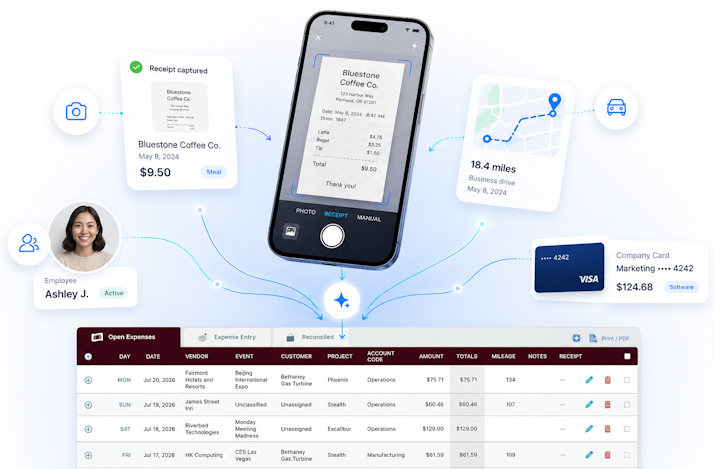
Employees can save expenses in Timesheets.com using anything from a mobile device to their desktop computer. Expenses can be grouped for reporting purposes, linked back to specific customers, and include an image of the receipt and a full audit trail. Once new expenses are saved, managers can view and process them (into QuickBooks, for instance) in real time.
Timesheets.com allows managers to save a default mileage rate. When employees drive, they enter the amount of miles on their phone and can even photograph the odometer to upload along with the entry. Miles are converted into a dollar amount when displayed on employee expense sheets.
Yes, and Timesheets.com doesn't stop with just handling travel expenses. Our expense sheet can be used to track things like bonuses and commissions, day rates, per diems, and even cash advances or negative amounts. We've tried to make our expense module flexible to meet the varied needs of our customers.
Yes, Timesheets.com can export expenses to QuickBooks Online and QuickBooks Desktop editions. Contact us for additional information or product support if you'd like more details.
Yes, expenses can be differentiated in reporting, for instance, between those paid for using a company credit card and those paid for by the employee using personal funds. Freelancers and private individuals use who Timesheets.com to track personal finances can also track and differentiate personal from business expenses.
Our software is designed specifically for use online by small and medium sized teams. We like to think we've done a good job making it easy for employees to use, but we invite you to make your own determination by signing up for a free trial. Our mobile site is designed with simplicity in mind to make data entry by employees fast and painless, even without formal training. The desktop version is optimized for managers to manager their workers and view their data.
Timesheets.com data is stored professionally in secure data centers with round-the-clock monitoring and secure backups. We retain data to comply with various requirements, but accounts can be deleted by request. Please review our, Terms of Use, Data Processing Agreement, and Privacy Statement for additional information.
Timesheets.com has excellent reporting and data exporting capabilities. Reports can be generated by vendor, worker, client, or by using other differentiators and filters allowing for very granular reports and exports. Both time and expense data can be exported in CSV (spreadsheet ready) formats or as PDFs.
Timesheets.com tracks every transaction and every modification or edit to those transactions. The audit trail is readily available and includes standard and necessary information like, for instance, who made changes to a recorded expense, and when those changes were made.
There is no extra charge for mileage and expense tracking in Timesheets.com. The expense tracking functionality is built natively into our product and is included with every account.
Timesheets.com > Mileage and Expense