PTO Tracking Made Effortless for Employees and Managers
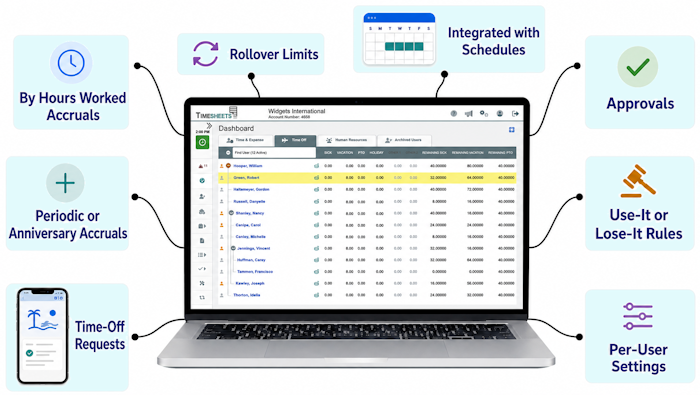
At the same time you're giving employees a simple way to request time off, view balances, and plan vacations , you're gaining control with formal approvals, coverage visibility, and accurate time-off record keeping.

FOR EMPLOYEES
Self Service And Visibility
- Very easy to learn
- Easy to check balances
- Easy to request time off
- Easy to track usage

FOR MANAGERS
Manage PTO Without the Stress
- Flexible time off policies
- Flexible accrual schedule
- Flexible user settings
- Balance & usage histories

FOR EVERYONE
Simple, Fast, Mobile-Friendly
- Works on the go
- Real-time notifications
- Never miss an update
Our PTO Reports Are Actually Useful
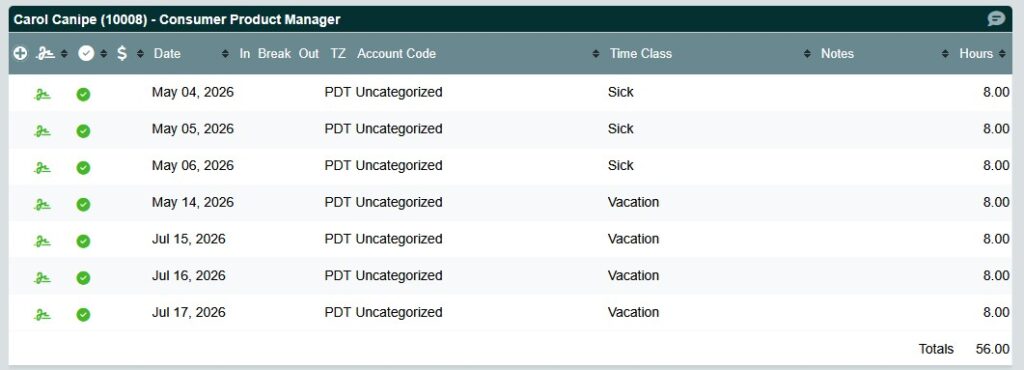
Reports like this one solve problems. When employees want to know things like how many hours they’ve taken this year, you’ll have the answer in a few clicks. This report and others like it make Timesheets.com an excellent choice for tracking time off.
Scheduling Around the Holidays? No Problem
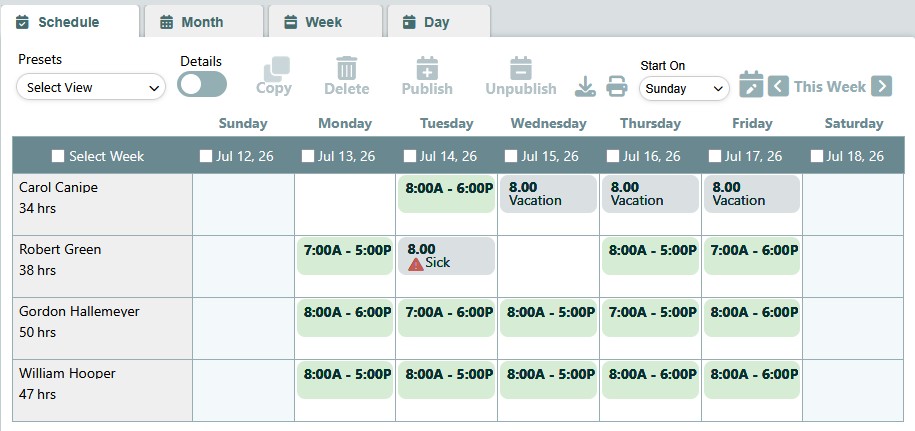
With Timesheets.com, time off entered on the timesheet is displayed automatically on employee work schedules so you’ll always have real-time information when you’re figuring out staffing for the upcoming work week.
Ready to make PTO tracking easier?
Frequently Asked Questions
How does PTO accrue, and can each employee have a different rate?
Accruals can be based on actual hours worked or on a preset schedule (yearly, monthly, semimonthly, biweekly, weekly, quarterly, or per pay period), and rates and categories are configured per user rather than forced into preset plans.
How do employees request time off, and how do managers approve it?
Employees submit a request from a form inside their own account by choosing the time classification, date, and hours. The request stays pending until a manager approves or denies it, and approved hours are debited from the balance automatically.
Can the system enforce carryover limits, balance caps, and use-it-or-lose-it rules?
Yes. Employers can set annual accrual caps, maximum balance caps that accommodate permitted rollover, and a use-it-or-lose-it rule that trims balances to a set amount on a chosen date.
Where do employees and managers see current balances?
Allocated time for the current payroll period and available balances appear on the Dashboard’s Time Off tab, and the approval screen shows requested dates next to the employee’s accrued balance so approvers aren’t guessing. Managers can also run summary or detailed reports by employee, date range, and category.
Can sick time be tracked separately from PTO instead of in one bucket?
Yes — multiple accrued balance types are supported per type and per user. Timesheets.com’s own example is an employee accruing PTO at 80 hours per year while sick time accrues each pay period on a by-hours-worked formula.
How do we accrue time for part-timers based on hours worked?
Timesheets.com says it can accommodate nearly any by-hours-worked rate and annual cap, and publishes a free By Hours Worked Accrual Calculator with an eligibility checker that flags when someone has hit the year’s maximum accruable hours.
What happens if an employee needs more time off than they've earned?
Allowing a negative balance is effectively a payroll loan, so Timesheets.com recommends a written policy covering repayment — either waiting for future accruals to bring the balance positive or deducting the value from a paycheck.
Does approved time off show up on the schedule?
Yes. Time off records flow into both the timesheet and the scheduling module, so managers see absences on a calendar and can catch overlapping requests before approving.
Timesheets.com > Time Off Tracking
Copyright 2004-2026 TimeclockOnline.com, Inc. All Rights Reserved.
Terms of Use | Privacy Statement