Employee Scheduling That Keeps You and Your Team Covered
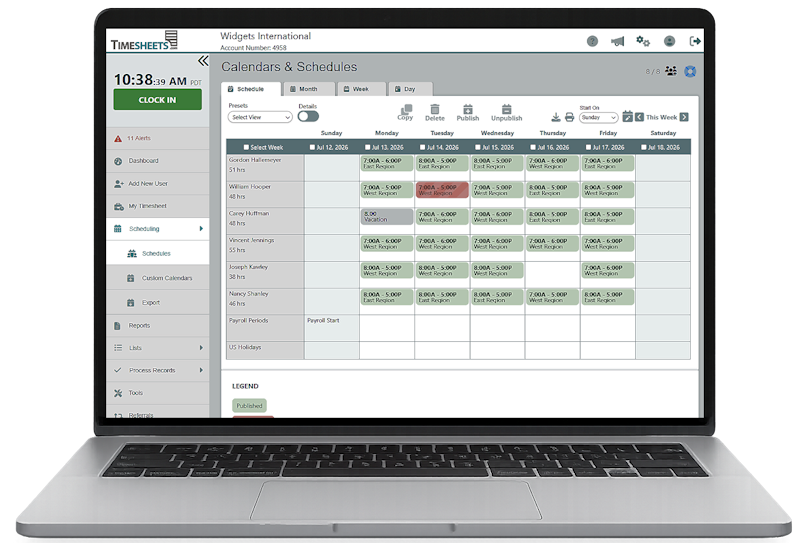
Build schedules in minutes, see who's available at a glance, and keep time tracking, time off, in perfect alignment with one system.
What Buyers Want to Know

Can I create schedules quickly?
Schedules can be created for an entire week in about 5-10 minutes. Features like drag to copy and day copy make schedules easy to create and maintain.

Can I see who's available?
Yes! There are a number of grid views for the day, week, and month that quickly shine a light on who’s not scheduled for work.

How will employees stay informed?
Employees can access schedules from their phones where they’ll see a list of their scheduled work times for the entire week on one page.

How does it connect to time tracking?
Timesheets.com schedules module is not third party software. It’s integrated with time and expense tracking on several levels giving you native-quality functionality.
Hourly Level Flexibility and Oversight with our Day-View Timeline
- Spot gaps in coverage
- Eliminate overlapping shifts
- Better shift transitions
- Identify bad or incorrectly planned shifts

Frequently Asked Questions
How quickly can I create an employee schedule?
Most weekly schedules can be created in just a few minutes. Managers can add shifts directly to the calendar and use copying tools to repeat individual shifts, days, or established scheduling patterns. Timesheets.com also provides separate tools for creating, copying, publishing, and unpublishing schedules.
Can I copy schedules from one day or week to another?
Yes. Instead of rebuilding recurring schedules, managers can copy existing shifts and reuse them for other employees, days, or scheduling periods. This makes it much faster to create schedules for teams that work consistent hours.
Can I see who is scheduled and who is available?
Yes. Day, week, and month views make it easy to see scheduled employees, available employees, staffing gaps, total scheduled hours, and overlapping shifts from one calendar.
Can I prepare a schedule before employees see it?
Yes. Managers can build and revise an unpublished schedule privately, then publish it when it is ready for employees. Published schedules can also be unpublished when additional changes are required.
Can I schedule employees at different locations?
Yes. Shifts can identify where an employee is expected to work, making it easier to organize employees across offices, departments, job sites, regions, or other work locations.
How do employees view their schedules?
Employees can sign in from a phone, tablet, or computer to see their published work schedule. The weekly view puts their upcoming shifts in one place, so they do not have to rely on paper schedules or contact a manager for their hours.
Does employee time off appear on the schedule?
Yes. Approved time off can be displayed alongside scheduled shifts, helping managers avoid scheduling employees when they are unavailable and making holiday or vacation staffing easier to manage.
Is scheduling connected to employee time tracking?
Yes. Scheduling is built into Timesheets.com rather than provided through a separate third-party scheduling product. Managers can use schedules alongside employee time, attendance, PTO, expenses, and other workforce information.
Does a scheduled shift automatically become paid time?
No. A schedule shows when an employee is expected to work, while the timesheet records the hours the employee actually worked. Payroll is based on recorded and approved time rather than the scheduled shift alone.
Can managers compare scheduled hours with actual work time?
Yes. Because scheduling and time tracking are part of the same system, managers can review scheduled work alongside clock punches and timesheet records to identify late arrivals, missed shifts, early departures, or differences between scheduled and actual hours.
Can I control who creates or changes schedules?
Yes. Scheduling access can be limited to the managers and supervisors responsible for particular employees or teams. This helps prevent unauthorized schedule changes while still allowing designated managers to maintain their own staff schedules.
Can I print employee schedules?
Yes. Schedules can be displayed in printable calendar views for posting at a workplace, sharing with supervisors, or keeping as an offline reference.
Timesheets.com > Employee Scheduling
Copyright 2004-2026 TimeclockOnline.com, Inc. All Rights Reserved.
Terms of Use | Privacy Statement