


Employee Scheduling Software
Timesheets.com offers a powerful — yet refreshingly easy-to-use — employee scheduling solution that stands out for its flexibility, clarity, and time-saving automation. With Timesheets.com, managers can build and publish weekly schedules in minutes, automatically account for employee availability, and avoid classic scheduling headaches like overlapping shifts, under or over-staffing, or missing coverage. The user interface is clean and intuitive: creating, editing, or duplicating schedules is fast and easy, and because the platform lives online, updates are available instantly.

Employee Scheduling Solutions
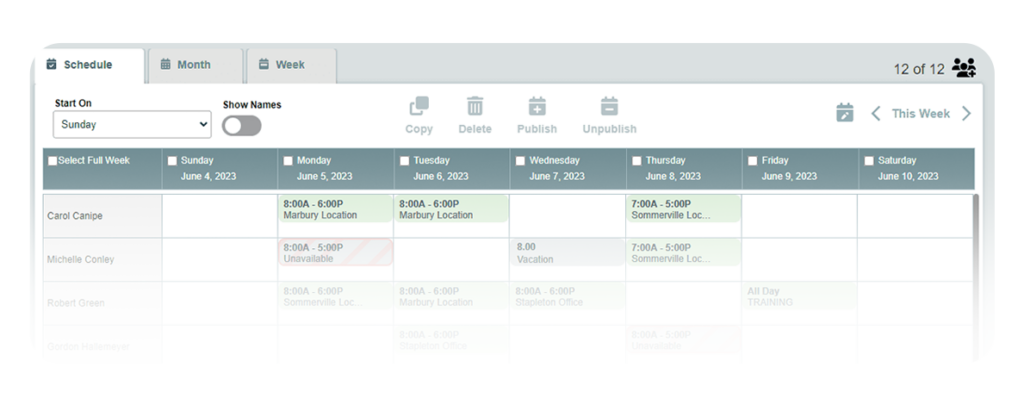
Timesheets.com lets managers create, copy, and assign shifts using a simple calendar interface that makes scheduling fast and error-free.
- Online employee scheduling – See who’s available at a glance
- Easy schedule maker – Duplicate successful schedules instantly
- Employee shifts management – Share schedules with one click
- Desktop/online scheduling – Accessible on desktop and mobile
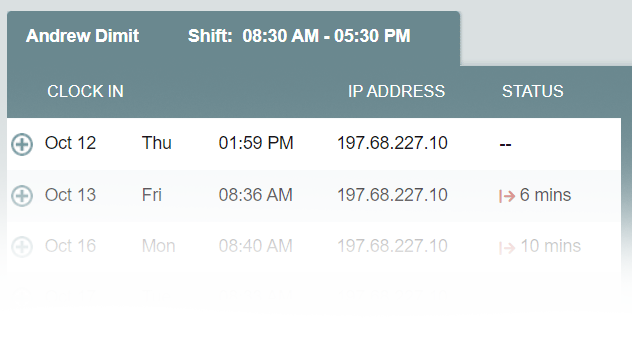
- Shiftboard visibility – Compare scheduled vs actual arrivals
Try Timesheets.com Employee Scheduling
Frequently Asked Questions about Employee Scheduling with Timesheets.com
How easy is it to create and update schedules?
Our interface is simple and easy to use. We include features designed to make it easy to create schedules, like drag to copy, cut and paste options, and flexibility in publishing content that makes employee scheduling easy to manage.
Does adding scheduling to my account cost extra?
No, employee scheduling is included with every account at no extra cost.
Can employees see their schedules on their phones?
Yes, employees can see their schedules on our mobile site for the entire week on one convenient screen.
How does your employee scheduling software support time tracking for payroll?
Our employee scheduling software is fully integrated with our timesheets allowing users to view their schedules anytime and managers to avoid scheduling workers on days when they have planned time off. Our reporting system compares actual work hours against planned shifts and generates a tardy report that shows early or late starts as well as missed or unscheduled shifts.
What size company is Timesheets.com employee scheduling software designed for?
Our employee scheduling software is designed primarily for small to medium sized offices but can easily scale up from single digit workers to larger operations with distributed teams and complex hierarchies. Supervisors can pick entire groups or individual schedules to work on making management fast and easy. Additionally, scheduling features like drag to copy and day-view help make scheduling your workforce as efficient as possible.
Does this employee scheduling software include human resource management features for PTO tracking?
Absolutely. Our employee scheduling software integrates with our hourly timesheet (for payroll) where employees track their time off usage and balances. PTO approval workflows automatically sync with schedules to prevent conflicts and worker generated time off requests can be approved directly from the schedule.
What tools does your employee scheduling software provide for shift planning?
Our employee scheduling software includes drag-and-drop scheduling, multi-day copying, and visual shift maps for comprehensive shift planning. The shift planner features color-coded availability, conflict detection, and real-time updates that make complex scheduling simple. These tools eliminate scheduling errors while providing complete visibility on staffing patterns.
Does the system prevent scheduling conflicts?
Yes, our software makes employee scheduling easy. Our visual interface is designed to highlight conflicts so it's easy to create error-free schedules. We also allow managers to overlay our schedules with HR information to prevent, for instance, scheduling employees on important dates they might want to take off, like their birthdays. The schedule also shows anniversary dates and annual review dates to ensure employees are present on dates they are needed.
How does your employee scheduling software compare to other scheduling software solutions?
Unlike other employee scheduling software applications, Timesheets.com provides all-in-one functionality combining scheduling with time tracking for payroll, billable time tracking, expense tracking, HR features, and comprehensive reporting. Our scheduling app approach eliminates the need for multiple vendor integrations, while seamless employee shift scheduling ensures teams stay aligned. Everything works together without additional fees or complex vendor relationships.
Can your scheduling software handle complex shift patterns?
Yes, our scheduling tools excel at managing complex schedules or shifts including repeating schedules, split shifts, and multi-day events. The system supports 24/7 operations with drag-and-drop scheduling, shift copying, and custom calendars that can be shared with specific people or groups.
How does your scheduling software handle employee availability and time-off requests?
Our integrated PTO system streamlines availability management by allowing supervisors to avoid scheduling a worker that has either specifically asked not to work at a specific time, or has scheduled time off.
Timesheets.com automatically checks employee timesheets for PTO and updates schedules to reflect planned leave dates. Time off prepopulates the calendar so you will know who not to schedule when they are off, preventing conflicts before they occur.
What makes Timesheets.com different from standalone scheduling solutions?
Unlike standalone scheduling apps, Timesheets.com provides comprehensive workforce management in one platform for one simple price of $5.50 per user per month. While competitors charge separately for time tracking, HR features, payroll integration, and scheduling, we include everything: scheduling, time tracking, expense tracking, PTO management, HR documents, and detailed reporting. Our 20+ years of experience means we've solved real scheduling challenges and can help with yours.
Timesheets.com > Employee Scheduling