Know When, Where, and How Your Employees Clock In
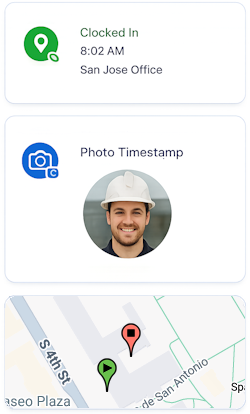
Remote employees can clock in from any phone or tablet. There's no app to install. GPS, photo timestamp, and real-time visibility keep everyone accountable.

Clock In Anywhere
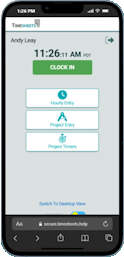
No app required. Any browser will do.

Know Where Work Starts
Optional GPS records punch locations.

Reduce Time Theft
GeoPunch, Photo Timestamp, and IP Lock

Works Across Devices
Works on any internet enabled device.
Common Mobile Time Tracking Problems
- It's hard to know where people are
- Buddy punching
- Unverified remote work
- Missed lunch punches
- Tracking down paper timesheets
- Payroll corrections
With Timesheets.com
- GPS verification
- Photo verification
- Easy edit requests
- Approval workflow
- Complete audit trail
- Payroll-ready hours
Need a Mobile Kiosk? No Problem!

No App Required
Our browser-based platform is always up to date, works on any device, and gets your team clocking in–fast
Ready to Get Started?
Schedule a 15-minute demo or start your free trial today!
Frequently Asked Questions
Do employees need to download an app, or can they track time from any mobile browser?
No app is required. Employees can enter time and expenses through the Timesheets.com mobile website using any device with a browser, and they can add an icon to their home screen for quicker access. Timesheets.com also offers Kiosk Mode for employees clocking in from a shared device. (support.timesheets.com)
What location data does Timesheets.com capture?
When geolocation is enabled, Timesheets.com captures the employee’s location when they clock in or out—not continuously throughout the day. The employee must permit location access, and managers can review the coordinates, map, and reported accuracy associated with each punch. (support.timesheets.com)
Can mobile punches be restricted to approved locations?
Businesses can use IP Address Lockdown to restrict punches to approved IP addresses. They can also record GEO coordinates and see them integrated with Google Maps to ensure all punches are from approved locations. (support.timesheets.com)
Can employees track billable time by customer or project from their phones?
Yes. Employees can enter time manually or run a project timer while selecting the appropriate customer, project, and account code. A new timer can pause an existing one, and an active timer continues running after the device is locked. Bill and cost rates can be applied to project time, with financial information restricted to authorized users, and reports can be exported for invoicing. (support.timesheets.com)
Can employees submit expenses, mileage, and receipt images from the field?
Yes. Mobile users can associate expenses with vendors, customers, projects, events, and account codes, and they can photograph a receipt or select an existing image. Mileage can also be recorded with an optional odometer image; supported attachments include JPG images and PDF files up to four pages. (support.timesheets.com)
How much battery power and mobile data does Timesheets.com use?
Timesheets.com mobile data usage is negligible. Our browser-based site does not remain open as a battery-draining background app. (support.timesheets.com)
Can managers approve time and expenses from a phone?
Yes, managers can switch between the mobile and desktop view to approve time from their mobile device. (support.timesheets.com)
How does Timesheets.com help prevent buddy punching without continuously monitoring employees?
Businesses can combine punch-time GPS capture, approved-IP restrictions, individual credentials, manager approvals, and audit histories. Photo Timestamp is also available, allowing you to capture a photo of the employee to ensure you know who is clocking in & out. (support.timesheets.com)
Timesheets.com > Mobile Time Tracking
Copyright 2004-2026 TimeclockOnline.com, Inc. All Rights Reserved.
Terms of Use | Privacy Statement