Security and Accountability Built Into Every Punch
Timesheets.com helps businesses verify who clocked-in and where they were at the time. We also provide all kinds of security tools like powerful audit abilities and reporting to ensure you're always paying employees the right amount for work performed.
Secure By Design
Every business runs differently, so Timesheets.com needs to be flexible in order to accommodate those diverse needs. That’s why we built security into the process. So flexibility doesn’t also mean vulnerability.

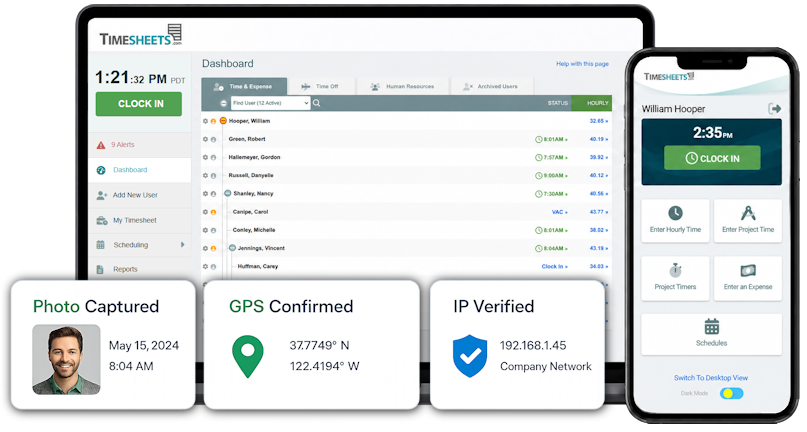
Photo Timestamp
Capture employee photos at punch-time to eliminate buddy punching.

IP Lock
Restrict punches to specific locations or devices to ensure employees are where they are supposed to be.

GEOPunch
Capture GPS coordinates at punch-time for all your field workers.

Notifications
Real-time alerts for clock punches, time change requests, other employee actions.

Audit Trail
Every punch edit, approval, or other change is recorded for complete transparancy.

User Restrictions
Configurable settings that limit access by time of day, location, and list item access.
Secure Engineering Practices
Timesheets.com uses industry leading infrastructure and business practices to ensure data security and customer privacy.

No Data Sharing Or Sales
Timesheets.com never sells or shares client data with third parties.

Encryption at Rest
All Timesheets.com data is encrypted at rest when in our possession.

Backups & Replication
Timesheets.com takes steps to ensure data is never lost.
Frequently Asked Questions
How does Timesheets.com prevent buddy punching?
Timesheets.com gives employers several ways to discourage and identify buddy punching. Photo Timestamp can capture an employee’s photo when a punch is made, giving managers a visual record of who actually clocked in or out. Employers can also combine photo verification with location and access restrictions for greater accountability.
Can I stop employees from clocking in before they arrive at work?
Timesheets.com can restrict when and where employees are allowed to punch.
For employees who work at a fixed location, IP Lock can limit punches to an approved workplace network. Other employee settings can be used to control access based on time of day and location.
Can I see where an employee was when they clocked in or out?
Yes. GPS verification can record an employee’s location when the punch is made.
Timesheets.com does not need to continuously track an employee throughout the day to provide punch-location accountability. Instead, the location associated with the punch gives managers a record of where work was started or stopped.
Can employees change their own time after they clock in?
Employee editing can be controlled rather than giving employees unrestricted ability to rewrite their timecards.
When an employee forgets a punch or discovers an error, Timesheets.com can support a correction workflow while preserving manager oversight.
This allows legitimate mistakes to be fixed without making the timecard an honor-system spreadsheet.
What happens when an employee forgets to clock in or out?
Missed punches happen, even with a well-managed workforce.
Timesheets.com provides a process for identifying and correcting missing punches so legitimate mistakes can be fixed before payroll. Managers retain visibility into the correction process instead of simply allowing the original record to disappear.
Can I tell when someone forgot to clock out?
Timesheets.com gives managers visibility into employees who are currently clocked in including indicators when employees have been in longer than 8 and 24 hours.
That makes it easier to catch an employee who is still shown as working long after the expected end of a shift rather than discovering the problem during payroll processing.
If a timecard is changed, can I see who changed it?
Timesheets.com maintains an audit trail so managers can review activity associated with time records.
That means changes don’t simply replace the history of what happened. The audit trail provides additional context around punches and subsequent activity, which is particularly valuable when a timecard is questioned later.
Can I use different security rules for different employees?
Yes. Timesheets.com allows you to administer each employee account with individual rules so problem employees can have more restrictive settings when appropriate. Similarly, trusted employees can have less restrictions.
Can employees clock in from any computer or phone?
That depends on how you set up your account. Employees that don’t need constant monitoring can be allowed to use personal devices while features like Kiosk, IP Lock and Photo Timestamp are designed to ensure accountability.
Can I require employees to clock in only from the workplace?
Yes. For employees who work from a fixed office, store, warehouse, or other facility, Timesheets.com can restrict access based on approved locations or networks.
This is especially useful when employees should be able to access certain parts of Timesheets.com remotely but should only be able to record working time from an authorized location.
Can supervisors correct mistakes without destroying the original record?
Corrections and manager oversight are made possible with our detailed audit trail feature.
The objective is to allow legitimate payroll errors to be corrected while still retaining a history that helps explain what happened. A correction shouldn’t make the original activity unknowable.
Can I see who's working right now?
Yes. Managers can see current employee status in real time, including employees who are clocked in or on break.
That makes Timesheets.com useful not only for preparing payroll later, but also for understanding what’s happening with your workforce in real time.
Timesheets.com > Security and Accountability
Copyright 2004-2026 TimeclockOnline.com, Inc. All Rights Reserved.
Terms of Use | Privacy Statement